MPC Plugins / Instruments / music production
Crazy Cassette 88
Free MPC Instrument plugin by vulnerablecodes · v1.0.7 · Nov 14, 2026 · 11 downloads
11
Downloads
0
GitHub stars
v1.0.7
Latest version
Nov 14, 2026
Updated
User rating
No ratings yet. Be the first.
Used it? Rate it:
Open plugins for MPC machines
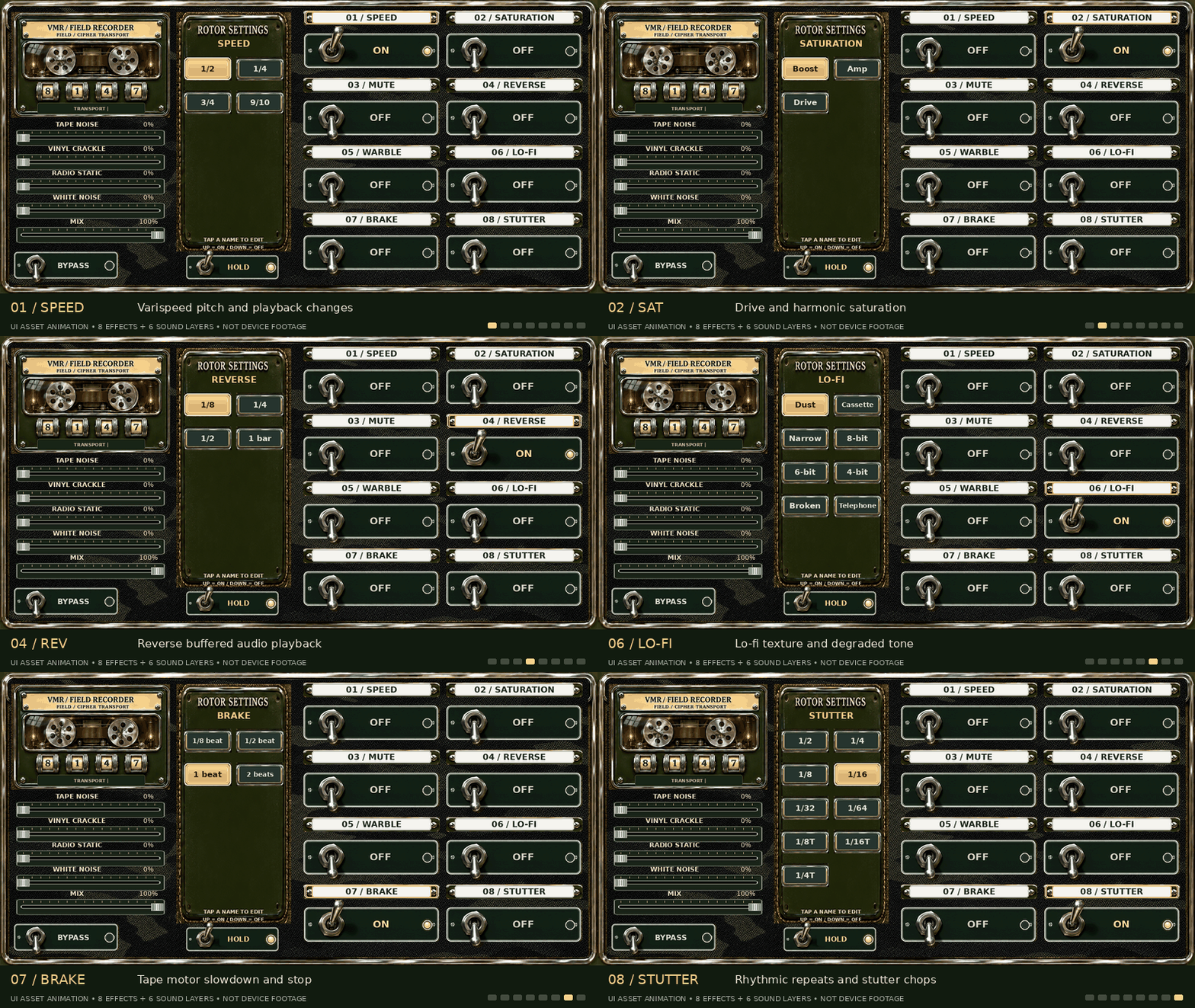
Eight independent performance circuits: Speed, Saturation, Mute, Reverse, Warble, Lo-Fi, Brake and Stutter. Realistic polished chrome bat-handle lever switches use UP = ON / DOWN = OFF. Tap a nameplate to select its Rotor Settings; enable state stays independent of selection. HOLD switches between latched and momentary circuit operation. Decorative
Download Crazy Cassette 88 v1.0.7
⚠ Not yet tested on hardware
This is a finished release, but the creator hasn't recorded a test of this version on a real MPC or Force. It may work fine; it may not. Back up first and try it on a project that doesn't matter.
✓ Safety check passed
- ✓ Download matches the checksum GitHub lists
- ✓ Built for: Gen1 (32-bit ARM), Gen2 (64-bit ARM)
- ✓ Runs on: MPC OS 3.x / MPC OS 2.x and 3.x
- ✓ No internet, web server, program-launching or system-changing functions found
- ✓ Nothing risky found in its installer
An automatic look at the files, not a guarantee: it can't see everything a program does. Always back up first.
Disclaimer: use entirely at your own risk
This plugin is made, owned and shared by an independent developer, not by The Disk King and not by Akai Professional or inMusic. The Disk King only lists it; the download comes directly from the developer's GitHub. The Disk King did not make, test, review or check it for safety and makes no promise that it works, is safe, or is free of bugs or harmful code.
Plugins install into your MPC's system and can crash it, corrupt or lose projects and samples, or require reinstalling MPC OS. Save your work and back up your MPC before installing anything.
Everything here is provided "as is", with no warranty of any kind. To the fullest extent the law allows, The Disk King is not responsible or liable for any damage, data loss, device failure, lost income or any other harm from downloading, installing or using any plugin listed here. By downloading or installing, you accept all risk and full responsibility. Full disclaimer.
Gen1: MPC Live, Live II, One, X, Key, Force
Crazy-Cassette-88-1.0.7-mpc-armv7.zip 5.0 MB
sha256: ffdf730d647f328ce3387c9acb23f67db0cebfad7ee85885af2e13d7bd36ecf0
Gen2: MPC Live III, One G2, Key G2, XL
Crazy-Cassette-88-1.0.7-mpc-aarch64.zip 5.0 MB
sha256: 6e3a495498bd894e666faee5d30021fcca190e0f09dea86935b0e628d6abc137
Downloads come straight from the creator's GitHub. Check the sha256 matches before installing. New to plugins? How to install plugins on MPC OS 3.10.1.
✓ Easy install on MPC OS 3.10.1: copy one folder
- Gen1 download: unzip it and copy
Tropix R!X Crazy Jungle Sounds - VST - Crazy Cassette 88intoVST2 Pluginson your drive. - Gen2 download: unzip it and copy
Tropix R!X Crazy Jungle Sounds - VST - Crazy Cassette 88intoVST2 Pluginson your drive.
Turn on External Plugin Support first. Full step-by-step guide.
Tested working on
The creator hasn't recorded a hardware test for this version yet.
Version history
v1.0.7 Nov 14, 2026 · 11 downloads
Original olive-drab canvas and polished-chrome FIELD / CIPHER skin, with ivory mechanical keys, amber activity indicators and animated chrome reels. Eight independently engageable stereo tape effects. Downloads: - mpc-aarch64.zip: ARM64 / Gen2, including MPC XL. - mpc-armv7.zip: ARM32 / Gen1. - FIELD-CIPHER-MPC.zip: full package including editable source, original generated artwork, skin renderer, previews, revision history and verification logs. - SHA256SUMS.txt: ZIP checksums. Validation: native, ARM32 and ARM64 builds; SDK validation 0 errors / 0 warnings; native host simulator 20 passed / 0 warnings / 0 failures. The v1.0.7 skin has not yet been tested on physical MPC hardware. Earlier MPC XL owner testing applies to v1.0.5 only. Plugin UID and parameter IDs/order are preserved. Installation: MPC OS 3.10.1+, Preferences → Enhancements (Beta) → Enable Enhancements and External Plugin Support. Unzip and place the complete plugin folder under VST2 Plugins at the drive root. Use this version for the current interface.
More plugins like this
To improve this listing (for the creator)
- add a tested.json entry for the newest release (device and MPC OS)
Made this plugin? Add our badge to your README
 Paste this into your GitHub README. It updates itself when your plugin gets the Tested & Working badge.
[](https://thediskking.com/plugins/crazy-cassette-88/)