MPC Commander addin
Free MPC Addin plugin by jacob-sabella · v1.3.2 · Nov 16, 2026 · 7,074 downloads
7,074
Downloads
1
GitHub stars
v1.3.2
Latest version
Nov 16, 2026
Updated
User rating
No ratings yet. Be the first.
Used it? Rate it:
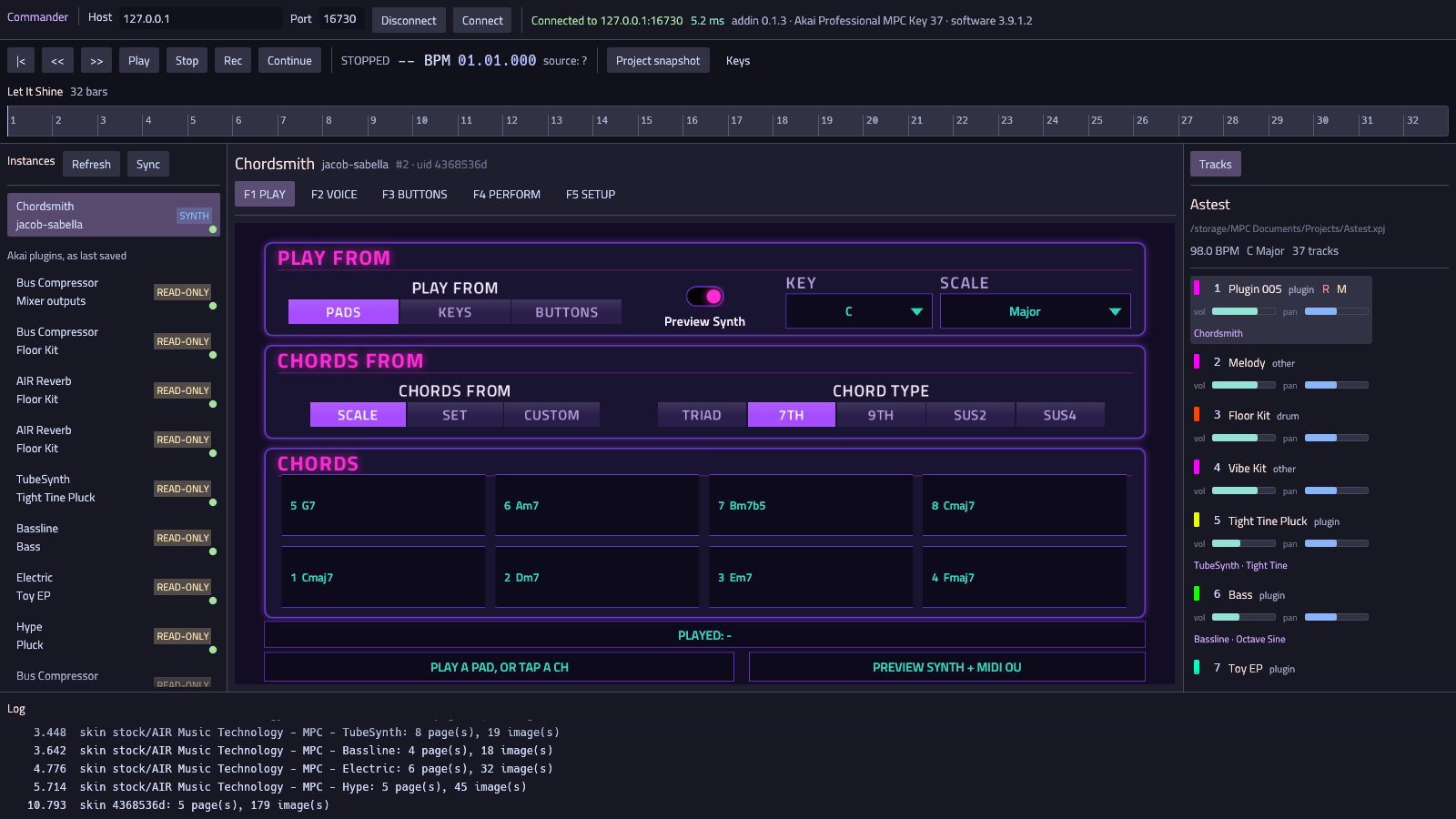
An MPC OS addin and desktop app: the plugins MPC loads, drawn with their own skins and edited live from a computer, plus transport, timeline, MIDI and the project's tracks
Dock an Akai MPC OS standalone device (MPC Live/One/X/Key, Force) to a computer: the plugins MPC has loaded appear in a native desktop app, drawn with their own skins, and follow and drive the device live. MPC's transport (play, stop, record, tempo, position) and the project's tracks are there too, and the app plays MIDI into MPC.
Download MPC Commander addin v1.3.2
⚠ Not yet tested on hardware
This is a finished release, but the creator hasn't recorded a test of this version on a real MPC or Force. It may work fine; it may not. Back up first and try it on a project that doesn't matter.
⚑ Safety check: review the notes below
- ✓ Download matches the checksum GitHub lists
- ✓ Built for: Gen1 (32-bit ARM), Gen2 (64-bit ARM)
- ✓ Runs on: MPC OS 3.x / MPC OS 2.x and 3.x
- ⚑ The plugin runs a small web page on your Wi-Fi (often its phone or browser screen).
- These can be completely normal for what the plugin does, but know them before installing.
- ✓ Nothing risky found in its installer
An automatic look at the files, not a guarantee: it can't see everything a program does. Always back up first.
Disclaimer: use entirely at your own risk
This plugin is made, owned and shared by an independent developer, not by The Disk King and not by Akai Professional or inMusic. The Disk King only lists it; the download comes directly from the developer's GitHub. The Disk King did not make, test, review or check it for safety and makes no promise that it works, is safe, or is free of bugs or harmful code.
Plugins install into your MPC's system and can crash it, corrupt or lose projects and samples, or require reinstalling MPC OS. Save your work and back up your MPC before installing anything.
Everything here is provided "as is", with no warranty of any kind. To the fullest extent the law allows, The Disk King is not responsible or liable for any damage, data loss, device failure, lost income or any other harm from downloading, installing or using any plugin listed here. By downloading or installing, you accept all risk and full responsibility. Full disclaimer.
Gen1: MPC Live, Live II, One, X, Key, Force
MPC-Commander-addin-1.3.2-mpc-armv7.zip 253 KB
sha256: 63f36b2e9473b9b41d85a21325a4df08bbda1c2b0c8c1790242013c6616283b6
Gen2: MPC Live III, One G2, Key G2, XL
MPC-Commander-addin-1.3.2-mpc-aarch64.zip 259 KB
sha256: e50868d37ce1b40d244c9b58dea852aca9878fa9d22d3514b6bd26d683ecd659
Downloads come straight from the creator's GitHub. Check the sha256 matches before installing. New to plugins? How to install plugins on MPC OS 3.10.1.
Tested working on
The creator hasn't recorded a hardware test for this version yet.
Version history
v1.3.2 Nov 16, 2026 · 1,019 downloads
The plugins MPC loads, with their own skins, and MPC's transport, in a desktop app (through an SSH tunnel by default). ## Requirements - A Gen2 MPC OS standalone device (aarch64: Live III, One G2, Key(s) G2). The installer refuses anything else. - **Root shell access** (SSH) to the device. Stock MPC OS doesn't offer this; you need a modded unit. - Installing addins this way is unofficial: back up first, use at your own risk. ## Install 1. Unzip, then copy the whole folder to the device, e.g. `scp -r MPC-Commander-addin-1.3.2 root@<device-ip>:/tmp/` 2. Run it: `ssh root@<device-ip> sh /tmp/MPC-Commander-addin-1.3.2/install.sh` The installer copies the addin into `/data/mpc-addins/commander/`, adds `mpc_commander_addin.so` to the `LD_PRELOAD` list of MPC's service and **restarts MPC** (save your project first). The list is extended, never replaced: other addins and the libraries the firmware preloads stay. Where no writable file sets the list (the unit is on the read-only root), one drop-in shared by every addin sets it, `/etc/systemd/system/<service>.service.d/90-mpc-addins.conf`. Re-run the installer after a firmware update. `-y` skips the question, `-n` leaves the restart to you. Settings are in `/data/mpc-addins/commander/mpc_commander_addin.conf`; an upgrade keeps your edits. It listens on the device only. From your computer: ssh -L 6730:127.0.0.1:6730 root@<device address>, then connect the MPC Commander desktop app to localhost:6730 (bind and port are in mpc_commander_addin.conf). For transport and MIDI, enable the MPC Commander port in MPC's MIDI preferences: as an input (with Receive MMC on) and as an output with clock sync and Send MMC. Uninstalling and the file list are in `INSTALL.md` inside each zip. --- Built by GitHub Actions from jacob-sabella/mpc-addin-commander@28cdf64 with mpc-vst-plugins@dbe1f2b.
v1.3.1 Nov 13, 2026 · 913 downloads
**Installer update for MPC OS 3.10.1.** The addin is unchanged from 1.3.0; only the bundled installer is new (open-mpc/mpc-vst-plugins at dbe1f2b). - Fixes "Read-only file system" under `/etc/systemd/system/acvs.service.d/` when installing or updating on 3.10.1. - **Gen1 with Akai's user access on (e.g. Key 37):** `/etc` is a read-only overlay stacked on a writable one; the drop-in is written in the writable layer and persists across reboots (open-mpc/mpc-vst-plugins#834). - **Gen2 (e.g. Live III):** `/etc` is read-only, so the addin loads through a `/run` drop-in. `/run` is cleared at every reboot; the **Addin Restore** patch (Plugin Manager → PATCHES) puts it back at start-up. Already have Commander? Reinstall it (Plugin Manager or the installer app): an addin installed from an older release keeps its older installer. --- The plugins MPC loads, with their own skins, and MPC's transport, in a desktop app (through an SSH tunnel by default). ## Requirements - A Gen2 MPC OS standalone device (aarch64: Live III, One G2, Key(s) G2). The installer refuses anything else. - **Root shell access** (SSH) to the device. Stock MPC OS doesn't offer this; you need a modded unit. - Installing addins this way is unofficial: back up first, use at your own risk. ## Install 1. Unzip, then copy the whole folder to the device, e.g. `scp -r MPC-Commander-addin-1.3.1 root@<device-ip>:/tmp/` 2. Run it: `ssh root@<device-ip> sh /tmp/MPC-Commander-addin-1.3.1/install.sh` The installer copies the addin into `/data/mpc-addins/commander/`, adds `mpc_commander_addin.so` to the `LD_PRELOAD` list of MPC's service and **restarts MPC** (save your project first). The list is extended, never replaced: other addins and the libraries the firmware preloads stay. Where no writable file sets the list (the unit is on the read-only root), one drop-in shared by every addin sets it, `/etc/systemd/system/<service>.service.d/90-mpc-addins.conf`. Re-run the installer after a firmware update. `-y` skips the question, `-n` leaves the restart to you. Settings are in `/data/mpc-addins/commander/mpc_commander_addin.conf`; an upgrade keeps your edits. It listens on the device only. From your computer: ssh -L 6730:127.0.0.1:6730 root@<device address>, then connect the MPC Commander desktop app to localhost:6730 (bind and port are in mpc_commander_addin.conf). For transport and MIDI, enable the MPC Commander port in MPC's MIDI preferences: as an input (with Receive MMC on) and as an output with clock sync and Send MMC. Uninstalling and the file list are in `INSTALL.md` inside each zip. --- Built by GitHub Actions from jacob-sabella/mpc-addin-commander@55a805a with mpc-vst-plugins@dbe1f2b.
v1.3.0 Nov 9, 2026 · 688 downloads
The plugins MPC loads, with their own skins, and MPC's transport, in a desktop app (through an SSH tunnel by default). ## Requirements - A Gen2 MPC OS standalone device (aarch64: Live III, One G2, Key(s) G2). The installer refuses anything else. - **Root shell access** (SSH) to the device. Stock MPC OS doesn't offer this; you need a modded unit. - Installing addins this way is unofficial: back up first, use at your own risk. ## Install 1. Unzip, then copy the whole folder to the device, e.g. `scp -r MPC-Commander-addin-1.3.0 root@<device-ip>:/tmp/` 2. Run it: `ssh root@<device-ip> sh /tmp/MPC-Commander-addin-1.3.0/install.sh` The installer copies the addin into `/data/mpc-addins/commander/`, adds `mpc_commander_addin.so` to the `LD_PRELOAD` list of MPC's service and **restarts MPC** (save your project first). The list is extended, never replaced: other addins and the libraries the firmware preloads stay. Where no writable file sets the list (the unit is on the read-only root), one drop-in shared by every addin sets it, `/etc/systemd/system/<service>.service.d/90-mpc-addins.conf`. Re-run the installer after a firmware update. `-y` skips the question, `-n` leaves the restart to you. Settings are in `/data/mpc-addins/commander/mpc_commander_addin.conf`; an upgrade keeps your edits. It listens on the device only. From your computer: ssh -L 6730:127.0.0.1:6730 root@<device address>, then connect the MPC Commander desktop app to localhost:6730 (bind and port are in mpc_commander_addin.conf). For transport and MIDI, enable the MPC Commander port in MPC's MIDI preferences: as an input (with Receive MMC on) and as an output with clock sync and Send MMC. Uninstalling and the file list are in `INSTALL.md` inside each zip. --- Built by GitHub Actions from jacob-sabella/mpc-addin-commander@3fac707 with mpc-vst-plugins@9ca502a.
v1.2.0 Nov 6, 2026 · 745 downloads
## New in 1.2.0 - **MPC Sample:** the addin runs in the Sample's `MPC Sample` process and finds its settings and open project. - **Browser UI:** the plugins' panels and MPC's transport in a browser, as well as in the desktop app. - **MPC Sample rack** (with mpc-addin-sample-rack): add, remove and turn plugins on or off from the browser. With rack 0.3.0, ON/OFF on a running plugin acts at once (until MPC restarts; Apply writes it into the project). - **Compact parameters:** a Cards/Compact switch per plugin: one row per parameter (name, a bar to drag, the value). - Works alongside another addin that wraps plugins (the Sample rack), in either load order. The plugins MPC loads, with their own skins, and MPC's transport, in a desktop app (through an SSH tunnel by default). ## Requirements - A Gen2 MPC OS standalone device (aarch64: Live III, One G2, Key(s) G2). The installer refuses anything else. - **Root shell access** (SSH) to the device. Stock MPC OS doesn't offer this; you need a modded unit. - Installing addins this way is unofficial: back up first, use at your own risk. ## Install 1. Unzip, then copy the whole folder to the device, e.g. `scp -r MPC-Commander-addin-1.2.0 root@<device-ip>:/tmp/` 2. Run it: `ssh root@<device-ip> sh /tmp/MPC-Commander-addin-1.2.0/install.sh` The installer copies the addin into `/data/mpc-addins/commander/`, adds `mpc_commander_addin.so` to the `LD_PRELOAD` list of MPC's service and **restarts MPC** (save your project first). The list is extended, never replaced: other addins and the libraries the firmware preloads stay. Where no writable file sets the list (the unit is on the read-only root), one drop-in shared by every addin sets it, `/etc/systemd/system/<service>.service.d/90-mpc-addins.conf`. Re-run the installer after a firmware update. `-y` skips the question, `-n` leaves the restart to you. Settings are in `/data/mpc-addins/commander/mpc_commander_addin.conf`; an upgrade keeps your edits. It listens on the device only. From your computer: ssh -L 6730:127.0.0.1:6730 root@<device address>, then connect the MPC Commander desktop app to localhost:6730 (bind and port are in mpc_commander_addin.conf). For transport and MIDI, enable the MPC Commander port in MPC's MIDI preferences: as an input (with Receive MMC on) and as an output with clock sync and Send MMC. Uninstalling and the file list are in `INSTALL.md` inside each zip. --- Built by GitHub Actions from jacob-sabella/mpc-addin-commander@2082e12 with mpc-vst-plugins@a0dda4f.
v1.1.1 Nov 4, 2026 · 729 downloads
The plugins MPC loads, with their own skins, and MPC's transport, in a desktop app (through an SSH tunnel by default). ## Requirements - A Gen2 MPC OS standalone device (aarch64: Live III, One G2, Key(s) G2). The installer refuses anything else. - **Root shell access** (SSH) to the device. Stock MPC OS doesn't offer this; you need a modded unit. - Installing addins this way is unofficial: back up first, use at your own risk. ## Install 1. Unzip, then copy the whole folder to the device, e.g. `scp -r MPC-Commander-addin-1.1.1 root@<device-ip>:/tmp/` 2. Run it: `ssh root@<device-ip> sh /tmp/MPC-Commander-addin-1.1.1/install.sh` The installer copies the addin into `/data/mpc-addins/commander/`, adds `mpc_commander_addin.so` to the `LD_PRELOAD` list of MPC's service and **restarts MPC** (save your project first). The list is extended, never replaced: other addins and the libraries the firmware preloads stay. Where no writable file sets the list (the unit is on the read-only root), one drop-in shared by every addin sets it, `/etc/systemd/system/<service>.service.d/90-mpc-addins.conf`. Re-run the installer after a firmware update. `-y` skips the question, `-n` leaves the restart to you. Settings are in `/data/mpc-addins/commander/mpc_commander_addin.conf`; an upgrade keeps your edits. It listens on the device only. From your computer: ssh -L 6730:127.0.0.1:6730 root@<device address>, then connect the MPC Commander desktop app to localhost:6730 (bind and port are in mpc_commander_addin.conf). For transport and MIDI, enable the MPC Commander port in MPC's MIDI preferences: as an input (with Receive MMC on) and as an output with clock sync and Send MMC. Uninstalling and the file list are in `INSTALL.md` inside each zip. --- Built by GitHub Actions from jacob-sabella/mpc-addin-commander@8f34ee4 with mpc-vst-plugins@8e266ce.
v1.1.0 Oct 22, 2026 · 1,171 downloads
The plugins MPC loads, with their own skins, and MPC's transport, in a desktop app (through an SSH tunnel by default). ## What's new in 1.1.0 - A Gen2 (aarch64) build, alongside the Gen1 (armv7) one (#3). - Preload chaining fix: `dlsym(RTLD_NEXT)` now searches the libraries loaded after the caller first, so Commander sits safely next to other addins that wrap the same functions (#1). ## Requirements - An MPC OS standalone device. Pick the zip for yours: - `mpc-armv7`: Gen1 (MPC Live/Live II, One, X, Key 61/37, Force) - `mpc-aarch64`: Gen2 (Live III, One G2, Key(s) G2), new in this release and not yet tested on a device The installer refuses the wrong one. - **Root shell access** (SSH) to the device. Stock MPC OS doesn't offer this; you need a modded unit. - Installing addins this way is unofficial: back up first, use at your own risk. ## Install 1. Unzip, then copy the whole folder to the device, e.g. `scp -r MPC-Commander-addin-1.1.0 root@<device-ip>:/tmp/` 2. Run it: `ssh root@<device-ip> sh /tmp/MPC-Commander-addin-1.1.0/install.sh` The installer copies the addin into `/data/mpc-addins/commander/`, adds `mpc_commander_addin.so` to the `LD_PRELOAD` list of MPC's service and **restarts MPC** (save your project first). The list is extended, never replaced: other addins and the libraries the firmware preloads stay. Where no writable file sets the list (the unit is on the read-only root), one drop-in shared by every addin sets it, `/etc/systemd/system/<service>.service.d/90-mpc-addins.conf`. Re-run the installer after a firmware update. `-y` skips the question, `-n` leaves the restart to you. Settings are in `/data/mpc-addins/commander/mpc_commander_addin.conf`; an upgrade keeps your edits. It listens on the device only. From your computer: ssh -L 6730:127.0.0.1:6730 root@<device address>, then connect the MPC Commander desktop app to localhost:6730 (bind and port are in mpc_commander_addin.conf). For transport and MIDI, enable the MPC Commander port in MPC's MIDI preferences: as an input (with Receive MMC on) and as an output with clock sync and Send MMC. Uninstalling and the file list are in `INSTALL.md` inside each zip. --- Built by GitHub Actions from jacob-sabella/mpc-addin-commander@a39c2d7 with mpc-vst-plugins@1acb45c.
v1.0.0 Oct 6, 2026 · 990 downloads
The plugins MPC loads, with their own skins, and MPC's transport, in a desktop app (through an SSH tunnel by default). ## Requirements - A first-generation MPC OS standalone device (32-bit ARM: Force, MPC Live / Live II, One, X, Key 61 and Key 37). - **Root shell access** (SSH) to the device. Stock MPC OS doesn't offer this; you need a modded unit. - Installing addins this way is unofficial: back up first, use at your own risk. ## Install 1. Unzip, then copy the whole folder to the device, e.g. `scp -r MPC-Commander-addin-1.0.0 root@<device-ip>:/tmp/` 2. Run it: `ssh root@<device-ip> sh /tmp/MPC-Commander-addin-1.0.0/install.sh` The installer copies the addin into `/data/mpc-addins/commander/`, adds `mpc_commander_addin.so` to the `LD_PRELOAD` list of MPC's service and **restarts MPC** (save your project first). The list is extended, never replaced: other addins and the libraries the firmware preloads stay. Where no writable file sets the list (the unit is on the read-only root), one drop-in shared by every addin sets it, `/etc/systemd/system/<service>.service.d/90-mpc-addins.conf`. Re-run the installer after a firmware update. `-y` skips the question, `-n` leaves the restart to you. Settings are in `/data/mpc-addins/commander/mpc_commander_addin.conf`; an upgrade keeps your edits. It listens on the device only. From your computer: ssh -L 6730:127.0.0.1:6730 root@<device address>, then connect the MPC Commander desktop app to localhost:6730 (bind and port are in mpc_commander_addin.conf). For transport and MIDI, enable the MPC Commander port in MPC's MIDI preferences: as an input (with Receive MMC on) and as an output with clock sync and Send MMC. Uninstalling and the file list are in `INSTALL.md` inside the zip. --- Built by GitHub Actions from jacob-sabella/mpc-addin-commander@cd72c01 with mpc-vst-plugins@a4b8f86.
v0.1.3 beta Oct 4, 2026 · 819 downloads
The plugins MPC loads, with their own skins, and MPC's transport, on a desktop app over the network. ## Requirements - A first-generation MPC OS standalone device (32-bit ARM: Force, MPC Live / Live II, One, X, Key 61 and Key 37). - **Root shell access** (SSH) to the device. Stock MPC OS doesn't offer this; you need a modded unit. - Installing addins this way is unofficial: back up first, use at your own risk. ## Install 1. Unzip, then copy the whole folder to the device, e.g. `scp -r MPC-Commander-addin-0.1.3 root@<device-ip>:/tmp/` 2. Run it: `ssh root@<device-ip> sh /tmp/MPC-Commander-addin-0.1.3/install.sh` The installer copies the addin into `/data/mpc-addins/commander/`, adds `mpc_commander_addin.so` to the `LD_PRELOAD` list of MPC's service and **restarts MPC** (save your project first). The list is extended, never replaced: other addins and the libraries the firmware preloads stay. Where no writable file sets the list (the unit is on the read-only root), one drop-in shared by every addin sets it, `/etc/systemd/system/<service>.service.d/90-mpc-addins.conf`. Re-run the installer after a firmware update. `-y` skips the question, `-n` leaves the restart to you. Settings are in `/data/mpc-addins/commander/mpc_commander_addin.conf`; an upgrade keeps your edits. It listens on the device only. From your computer: ssh -L 6730:127.0.0.1:6730 root@<device address>, then connect the MPC Commander desktop app to localhost:6730 (bind and port are in mpc_commander_addin.conf). For transport and MIDI, enable the MPC Commander port in MPC's MIDI preferences: as an input (with Receive MMC on) and as an output with clock sync and Send MMC. Uninstalling and the file list are in `INSTALL.md` inside the zip. --- Built by GitHub Actions from jacob-sabella/mpc-addin-commander@8c4a60d with mpc-vst-plugins@83c6cbd.
More plugins like this
MPC USB audio addin
by jacob-sabella · v1.2.1 · 7,946 downloads
Makes an Akai MPC standalone a class-compliant USB audio interface on its USB device port: an LD_PRELOAD addin
NAM
by jacob-sabella · v1.1.2 · 8,939 downloads
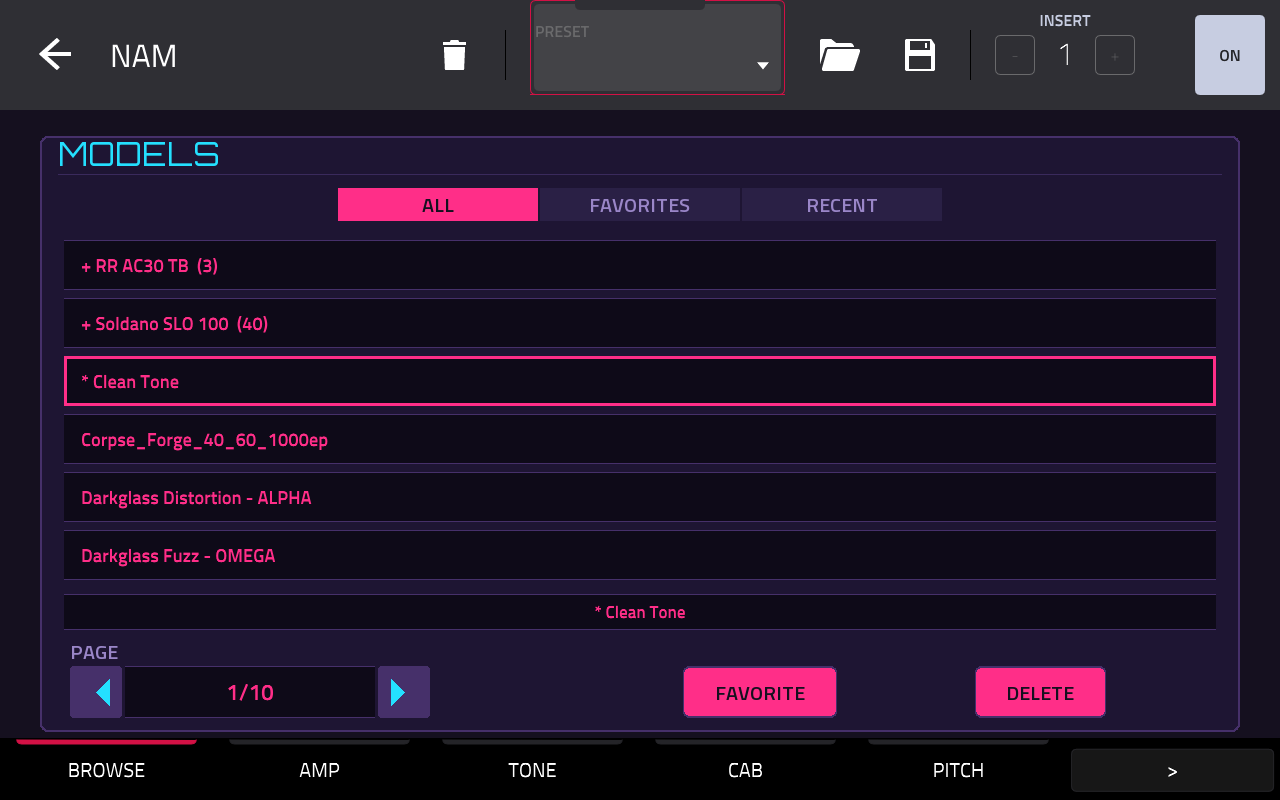
Neural Amp Modeler as a native VST2 insert effect for Akai MPC OS standalones: cab IR, tone, gate, pitch, delay, reverb and an on-device TONE3000 downloader.
MPC Remote addin
by jacob-sabella · v1.4.1 · 7,323 downloads
The screen and touchscreen of an Akai MPC standalone in a web browser, plus an MCP server: an LD_PRELOAD addin
MPC File Browser
by jacob-sabella · v1.1.1 · 5,658 downloads
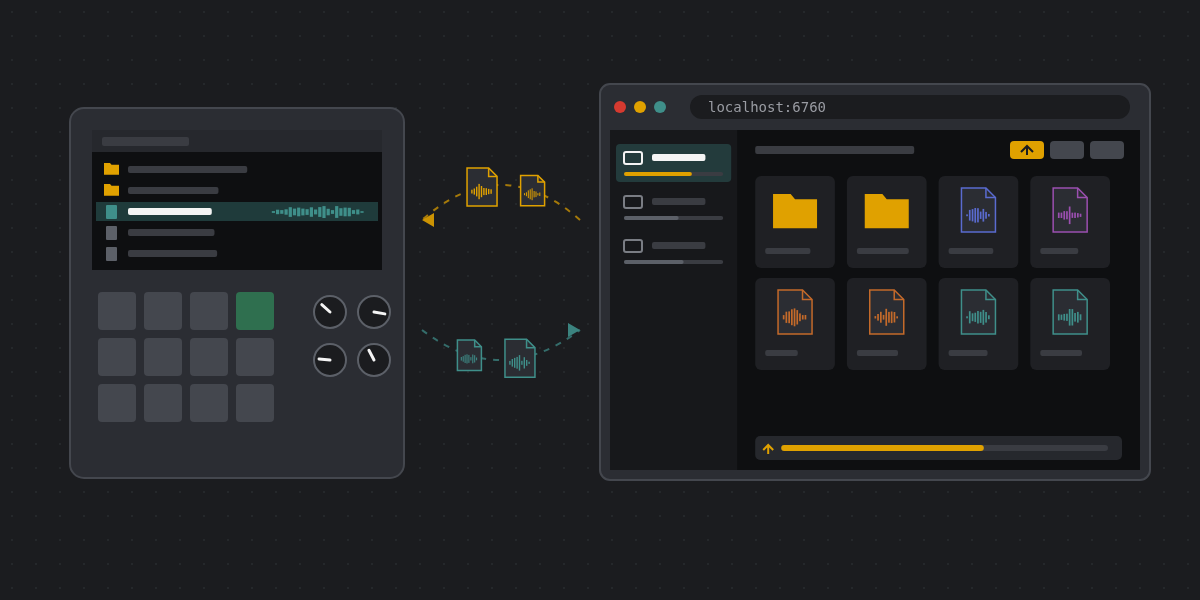
FileBrowser Quantum beside MPC on MPC OS standalone devices (Gen1 and Gen2): an addin, built from upstream releases in CI
MPC Gateway
by jacob-sabella · v1.0.2 · 2,991 downloads
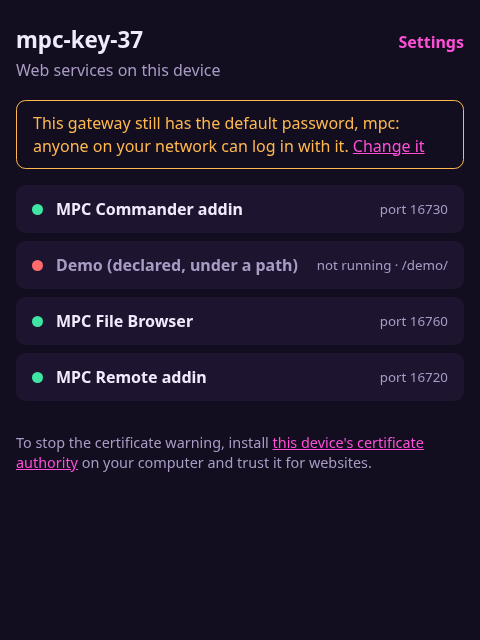
One HTTPS address with one password for the web pages MPC addins run (Caddy reverse proxy addin for MPC OS standalone devices)
Keyscope
by jacob-sabella · v1.1.2 · 8,992 downloads
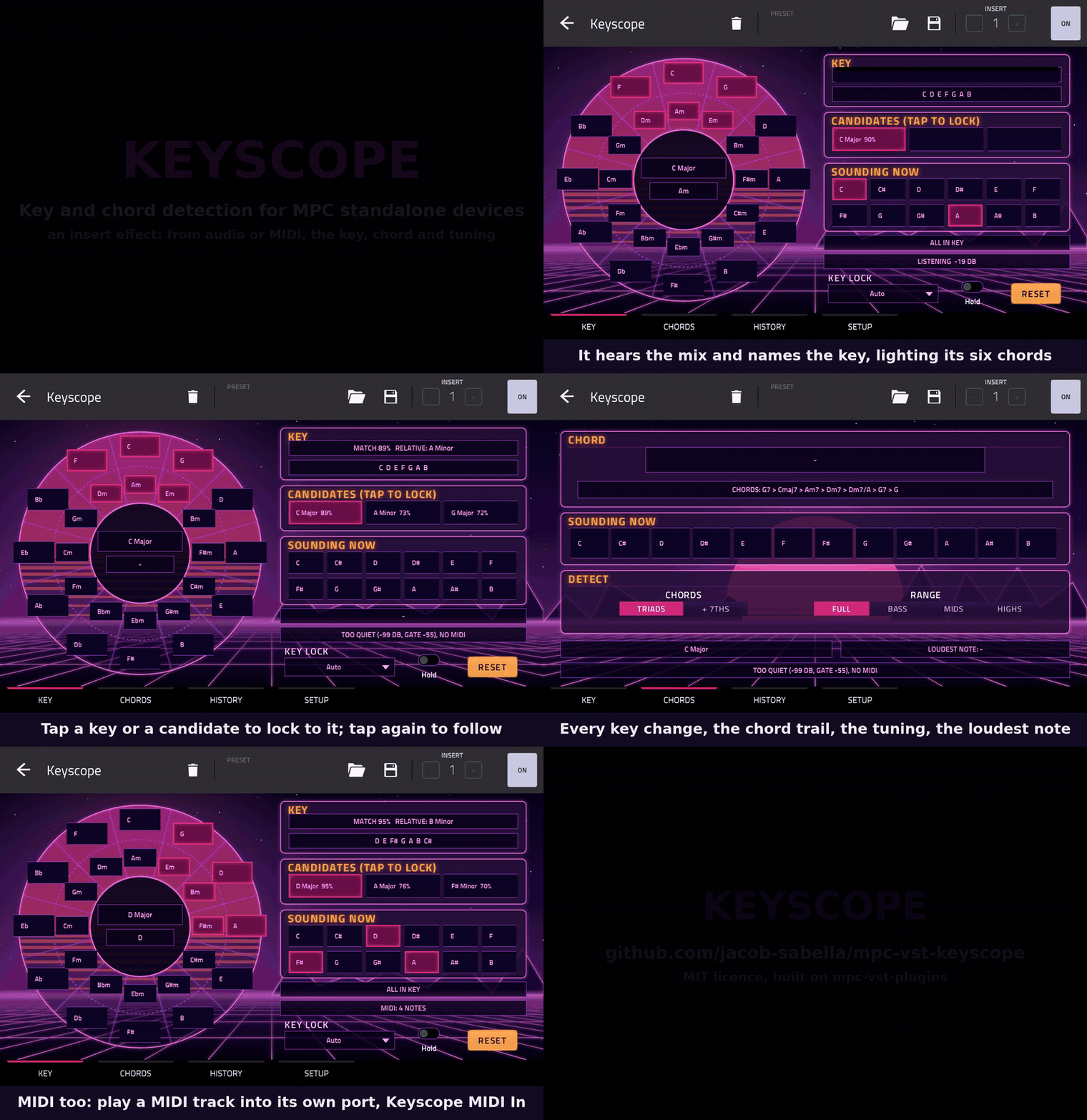
Key and chord detection for MPC OS standalone devices: a native VST2 insert effect that names the key, chord, bass note and tuning from audio or MIDI.
Chordsmith
by jacob-sabella · v1.0.6 · 8,465 downloads
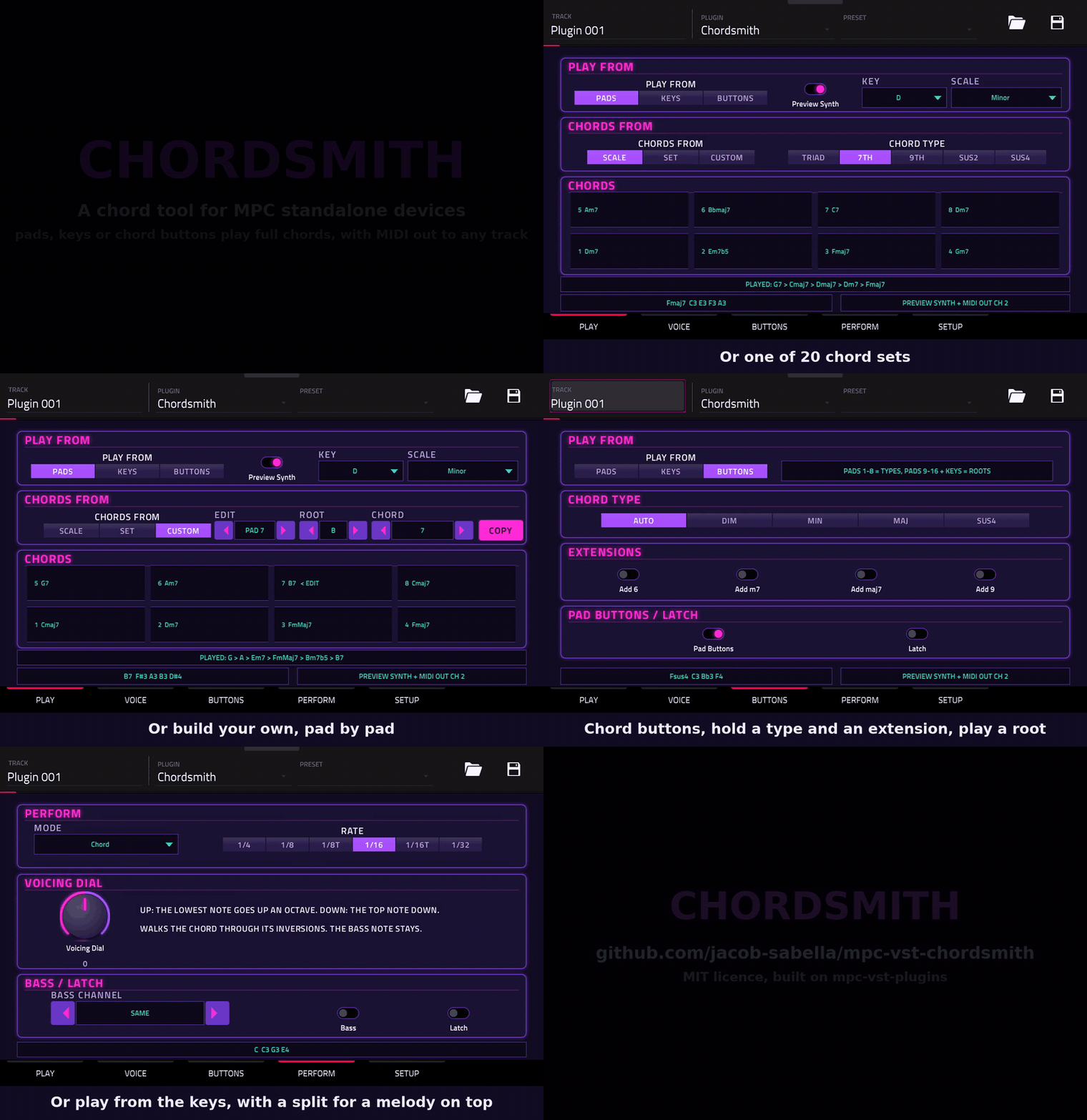
Chord tool for Akai MPC OS standalone devices: a native VST2 plugin with its own screen skin
Stompbox
by jacob-sabella · v1.1.2 · 4,784 downloads
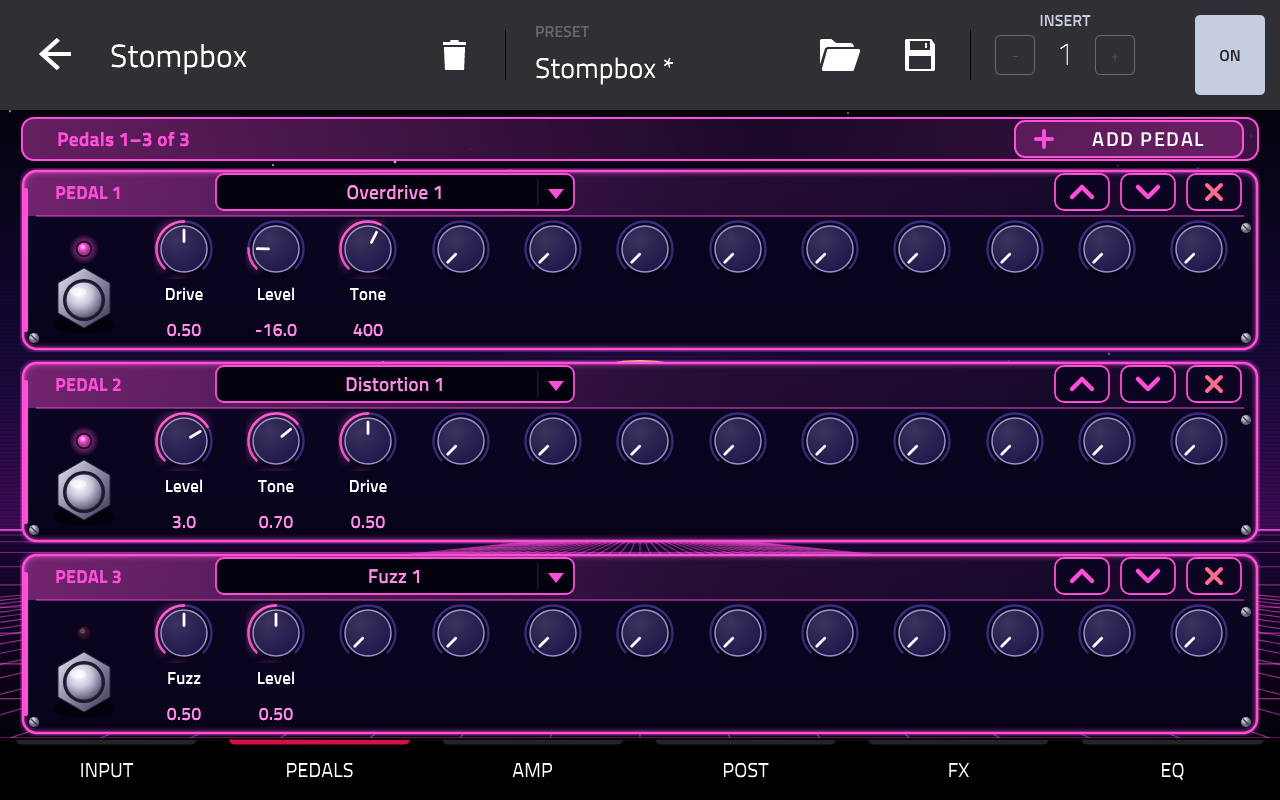
A whole guitar rig (guitarix and GxPlugins, 219 models, 40 factory presets) as one VST insert effect for Akai MPC OS standalone devices, with a native screen skin
To improve this listing (for the creator)
- add a tested.json entry for the newest release (device and MPC OS)
- explain the flagged behavior (network, running programs, installer commands) in the README
Made this plugin? Add our badge to your README
 Paste this into your GitHub README. It updates itself when your plugin gets the Tested & Working badge.
[](https://thediskking.com/plugins/mpc-commander-addin/)