MPC Plaits
Free MPC Instrument plugin by poloq-instruments · v1.0.1 · Oct 5, 2026 · 5,225 downloads
5,225
Downloads
1
GitHub stars
v1.0.1
Latest version
Oct 5, 2026
Updated
User rating
No ratings yet. Be the first.
Used it? Rate it:
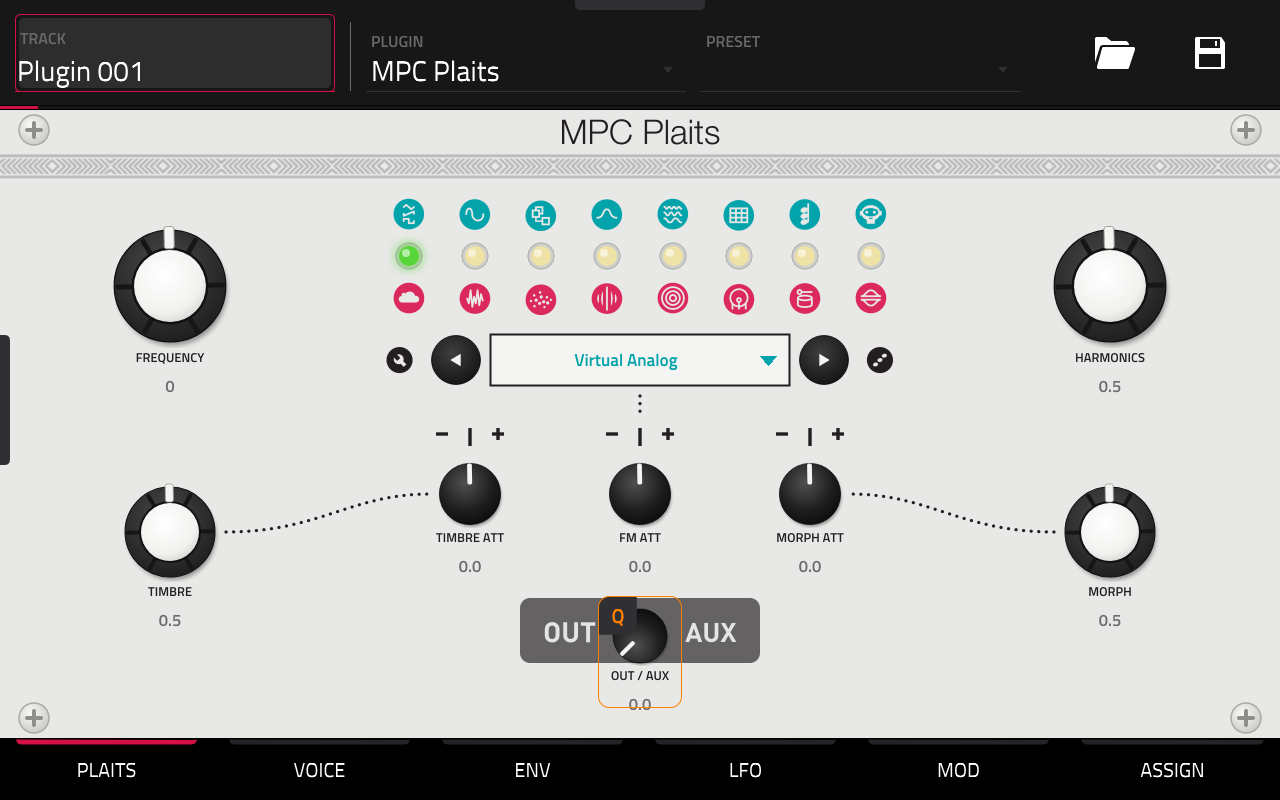
Mutable Instruments Plaits for MPC OS: all 24 models, polyphonic, mod matrix, touchscreen skin.
All 24 Plaits models, up to 8 voices, LFOs, envelopes and two modulation matrices, synced to the MPC's tempo, with a touchscreen skin and Q-Link control. It loads from the MPC's own plugin browser like any other instrument.
Download MPC Plaits v1.0.1
✓ Tested & working
The creator reports testing this exact version on real hardware: Akai MPC One, MPC OS 3.9.1. This is the creator's own report, not a guarantee from The Disk King. Still back up first.
✓ Safety check passed
- ✓ Download matches the checksum GitHub lists
- ✓ Built for: Gen1 (32-bit ARM)
- ✓ Runs on: MPC OS 2.x and 3.x
- ✓ No internet, web server, program-launching or system-changing functions found
- ✓ Nothing risky found in its installer
An automatic look at the files, not a guarantee: it can't see everything a program does. Always back up first.
Disclaimer: use entirely at your own risk
This plugin is made, owned and shared by an independent developer, not by The Disk King and not by Akai Professional or inMusic. The Disk King only lists it; the download comes directly from the developer's GitHub. The Disk King did not make, test, review or check it for safety and makes no promise that it works, is safe, or is free of bugs or harmful code.
Plugins install into your MPC's system and can crash it, corrupt or lose projects and samples, or require reinstalling MPC OS. Save your work and back up your MPC before installing anything.
Everything here is provided "as is", with no warranty of any kind. To the fullest extent the law allows, The Disk King is not responsible or liable for any damage, data loss, device failure, lost income or any other harm from downloading, installing or using any plugin listed here. By downloading or installing, you accept all risk and full responsibility. Full disclaimer.
Gen1: MPC Live, Live II, One, X, Key, Force
MPC-Plaits-1.0.1-mpc-armv7.zip 5.5 MB
sha256: 76986f7a6d221bcba9cb8e3289b659bb25527af146dde7df2b535cb259f1c763
Downloads come straight from the creator's GitHub. Check the sha256 matches before installing. New to plugins? How to install plugins on MPC OS 3.10.1.
Can't be copied by hand on MPC OS 3.10.1
This release's plugin folder has no plugin.json, which 3.10.1 needs to list it. Use the creator's installer (see INSTALL.md in the zip), or ask the creator for a 3.10.1 release. Why?
Tested working on
- Akai MPC One, MPC OS MPC OS 3.9.1 (Oct 5, 2026)
Version history
v1.0.1 Oct 5, 2026 · 4,153 downloads
Mutable Instruments Plaits as a native MPC OS VST2 instrument: all 24 models, up to 8 voices, LFOs, envelopes, cycle and random sources, a fixed and an assignable 4x4 mod matrix, tempo sync, and a six-page touchscreen skin with Q-Links. ## What's new in 1.0.1 - **About 12% less CPU on average**, up to ~30% on Snare Drum and Modal Resonator: the plugin is now built for the Cortex-A17 in Gen1 devices (`-mcpu=cortex-a17 -mfpu=neon-vfpv4 -O3 -funsafe-math-optimizations`). - Fast Q-Link sweeps peak lower: p99 ~30% → ~24% of an audio block. - No parameter changes: projects saved with 1.0.0 load as before. Pitched models sound the same; noise-driven models (Speech, Swarm, Particle, the drums) can render with slightly different random detail. Upgrading: run the 1.0.1 installer over 1.0.0; it replaces the plugin in place. ## Requirements - A first-generation MPC OS standalone device (32-bit ARM, like the Force, MPC Live / Live II, One, X and Key 61). The installer refuses anything else. Newer models are untested. - **Root shell access** (SSH) to the device. Stock MPC OS doesn't offer this; you need a modded unit. - Tested on an MPC One with MPC OS 3.9.1. Installing plugins this way is unofficial: back up first, use at your own risk. ## Install (scripted) 1. Unzip, then copy the whole folder to the device, e.g. `scp -r MPC-Plaits-1.0.1 root@<device-ip>:/tmp/` 2. Run it: `ssh root@<device-ip> sh /tmp/MPC-Plaits-1.0.1/install.sh` The installer checks the device, **stops MPC** (save your project first), copies `portable/poloq - VST - MPC Plaits/` (the plugin, its skin and its data, as one folder) into `/sdcard/Synths`, backs up `MPC.settings`, adds the plugin to MPC's plugin list from the folder's `plugin-meta.xml` and starts MPC again. Running it again upgrades in place, keeping your own files. An older install of this plugin (the previous layout, with the `.so` in `/sdcard/vst`) is replaced, not duplicated. `-y` skips the confirmation prompt; `-t <folder>` installs into another Synths folder (for example on a card). Then add **MPC Plaits** to a track from the plugin browser (Instrument plugins). Its screen appears in the plugin view, and the Q-Links follow the page. ## Uninstall `ssh root@<device-ip> sh /tmp/MPC-Plaits-1.0.1/uninstall.sh` removes the plugin folder and the plugin-list entry (it also stops and restarts MPC). Projects that use the plugin will load without it. Files you added yourself are kept. ## CPU Measured on a Gen1 device (MPC Live/One/X/Force class, Cortex-A17) with `tools/bench.sh` from [mpc-vst-plugins](https://github.com/sd88me/mpc-vst-plugins): worst p99 **23.7%** of one audio block, worst block 34.6%, verdict **WARN**. As a rule of thumb, several instances run comfortably when p99 is under 15%.
v1.0.0 Sep 30, 2026 · 1,072 downloads
Mutable Instruments Plaits as a native MPC OS VST2 instrument: all 24 models, up to 8 voices, LFOs, envelopes, cycle and random sources, a fixed and an assignable 4x4 mod matrix, tempo sync, and a six-page touchscreen skin with Q-Links. ## Requirements - A first-generation MPC OS standalone device (32-bit ARM, like the Force, MPC Live / Live II, One, X and Key 61). The installer refuses anything else. Newer models are untested. - **Root shell access** (SSH) to the device. Stock MPC OS doesn't offer this; you need a modded unit. - Tested on MPC OS with a Force. Installing plugins this way is unofficial: back up first, use at your own risk. ## Install (scripted) 1. Unzip, then copy the whole folder to the device, e.g. `scp -r MPC-Plaits-1.0.0 root@<device-ip>:/tmp/` 2. Run it: `ssh root@<device-ip> sh /tmp/MPC-Plaits-1.0.0/install.sh` The installer checks the device, **stops MPC** (save your project first), copies `portable/poloq - VST - MPC Plaits/` (the plugin, its skin and its data, as one folder) into `/sdcard/Synths`, backs up `MPC.settings`, adds the plugin to MPC's plugin list from the folder's `plugin-meta.xml` and starts MPC again. Running it again upgrades in place, keeping your own files. An older install of this plugin (the previous layout, with the `.so` in `/sdcard/vst`) is replaced, not duplicated. `-y` skips the confirmation prompt; `-t <folder>` installs into another Synths folder (for example on a card). Then add **MPC Plaits** to a track from the plugin browser (Instrument plugins). Its screen appears in the plugin view, and the Q-Links follow the page. ## Uninstall `ssh root@<device-ip> sh /tmp/MPC-Plaits-1.0.0/uninstall.sh` removes the plugin folder and the plugin-list entry (it also stops and restarts MPC). Projects that use the plugin will load without it. Files you added yourself are kept. ## Install by hand 1. Copy `portable/poloq - VST - MPC Plaits/` to `/sdcard/Synths/poloq - VST - MPC Plaits/`. It holds `plaits.so`, `plugin-meta.xml`, `version.xml`, `Plugin Skins/` and the data: 2. Stop MPC: `systemctl stop acvs` 3. Back up the settings file, `MPC.settings` (on a Force: `/media/az01-internal/Settings/MPC/MPC.settings`). 4. In `MPC.settings`, inside `<VALUE name="pluginList-arm"><KNOWNPLUGINS>`, add the line from `plugin-meta.xml` with `%payload-path%` replaced by `/sdcard/Synths`. If there is no `pluginList-arm` value yet, add one just before `</PROPERTIES>`: ```xml <VALUE name="pluginList-arm"> <KNOWNPLUGINS> (the line from plugin-meta.xml) </KNOWNPLUGINS> </VALUE> ``` 5. Start MPC: `systemctl start acvs`. If MPC shows default settings, restore your backup (the XML was malformed). Edit `MPC.settings` only while MPC is stopped: MPC can save its own copy over a change made while it runs. Tools that rebuild the whole plugin list from the plugin folders in `Synths` keep this plugin, because it is such a folder. ## CPU Measure
To improve this listing (for the creator)
- publish a Gen2 (aarch64) build
Made this plugin? Add our badge to your README
 Paste this into your GitHub README. It updates itself when your plugin gets the Tested & Working badge.
[](https://thediskking.com/plugins/mpc-plaits/)