Frodhes
Free MPC Instrument plugin by leonardoMirabal · v0.9.14 · Nov 24, 2026 · 2,073 downloads
2,073
Downloads
17
GitHub stars
v0.9.14
Latest version
Nov 24, 2026
Updated
User rating
No ratings yet. Be the first.
Used it? Rate it:
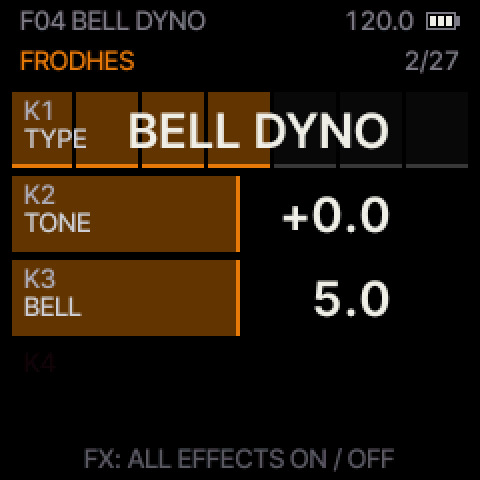
Physically modelled electric piano, vibraphone and marimba for the M-VAVE FM-1, SMK-37 and MKE-P37 keyboards, plus Ableton Move, and a CLAP/VST3/AU plugin for macOS, Windows and Linux. No samples. Effects, arpeggiator, sequencer, scales, presets and a web emulator.
No samples: every note is calculated as you play it, from how the real instrument works. A hammer strikes a tine and a pickup turns its motion into sound; a mallet strikes a bar and its tube rings along. Play softly and it is warm; play hard and it barks or rings.
Download Frodhes v0.9.14
⚠ Not yet tested on hardware
This is a finished release, but the creator hasn't recorded a test of this version on a real MPC or Force. It may work fine; it may not. Back up first and try it on a project that doesn't matter.
✓ Safety check passed
- ✓ Download matches the checksum GitHub lists
- ✓ Built for: Gen1 (32-bit ARM), Gen2 (64-bit ARM)
- ✓ Runs on: MPC OS 3.x / MPC OS 2.x and 3.x
- ✓ No internet, web server, program-launching or system-changing functions found
- ✓ Nothing risky found in its installer
An automatic look at the files, not a guarantee: it can't see everything a program does. Always back up first.
Disclaimer: use entirely at your own risk
This plugin is made, owned and shared by an independent developer, not by The Disk King and not by Akai Professional or inMusic. The Disk King only lists it; the download comes directly from the developer's GitHub. The Disk King did not make, test, review or check it for safety and makes no promise that it works, is safe, or is free of bugs or harmful code.
Plugins install into your MPC's system and can crash it, corrupt or lose projects and samples, or require reinstalling MPC OS. Save your work and back up your MPC before installing anything.
Everything here is provided "as is", with no warranty of any kind. To the fullest extent the law allows, The Disk King is not responsible or liable for any damage, data loss, device failure, lost income or any other harm from downloading, installing or using any plugin listed here. By downloading or installing, you accept all risk and full responsibility. Full disclaimer.
Gen1: MPC Live, Live II, One, X, Key, Force
Frodhes-0.9.14-mpc-armv7.zip 9.0 MB
sha256: 1df58426453bf5ddfd09a0c6f150fa706a5799d5553e5ad96a41d0ae4d56b277
Gen2: MPC Live III, One G2, Key G2, XL
Frodhes-0.9.14-mpc-aarch64.zip 9.7 MB
sha256: 9153a71e59f2dda551258375d94a93b4a4d3aa018a23831b8d855356685be98c
Downloads come straight from the creator's GitHub. Check the sha256 matches before installing. New to plugins? How to install plugins on MPC OS 3.10.1.
✓ Easy install on MPC OS 3.10.1: copy one folder
- Gen1 download: unzip it and copy
Frodhes - VST - Frodhes(insideFrodhes-0.9.14/portable/) intoVST2 Pluginson your drive. - Gen2 download: unzip it and copy
Frodhes - VST - Frodhes(insideFrodhes-0.9.14/portable/) intoVST2 Pluginson your drive.
Turn on External Plugin Support first. Full step-by-step guide.
Tested working on
The creator hasn't recorded a hardware test for this version yet.
Version history
v0.9.14 Nov 24, 2026 · 243 downloads
**Frodhes 0.9.14** adds WHURLI, a reed electric piano that growls when you strike hard, with four presets; the TYPE controller (CC 80) now reaches all five electric pianos; EARLY FELT and BELL DYNO are evened out across the keyboard; and the desktop plugin gets a drive of its own, WARM. **Download:** `frodhes.fwsc` below (the same file as `frodhes-0.9.14.fwsc`; the newest is always at https://github.com/leonardoMirabal/frodhes/releases/latest/download/frodhes.fwsc). **Try it first in your browser:** https://leonardomirabal.github.io/frodhes/ ### Install **FM-1**: download `frodhes.fwsc` below. Install it from the [emulator page](https://leonardomirabal.github.io/frodhes/#install) (Chrome or Edge, **Install on your FM-1 or SMK-37**), or from a terminal: ```sh pip install mido python-rtmidi python3 tools/fm1_install.py frodhes.fwsc ``` Your settings, presets and pattern are kept. If anything goes wrong, switch the FM-1 off, hold **OCT−** and switch it on: that is the USB rescue, and you can install again from there. **Computer (plugin)**: `frodhes-plugin-macos.pkg` (or `frodhes-plugin-macos.zip`), `frodhes-plugin-windows.zip`, `frodhes-plugin-linux-x86_64.zip` or `frodhes-plugin-linux-aarch64.zip` below. How to install each: [PLUGIN.md](https://github.com/leonardoMirabal/frodhes/blob/main/docs/PLUGIN.md#packages). **Move**: you need Schwung on the Move. Install Frodhes with Schwung Manager in a web browser: **Install Custom Module > From GitHub URL**, `leonardoMirabal/frodhes`. Or download `frodhes-module.tar.gz` below and use **From Tarball**. Details: [the Move manual](https://github.com/leonardoMirabal/frodhes/blob/main/docs/MOVE.md#install). **Akai MPC**: `frodhes-mpc.zip` below (MPC OS 3.10.1 or later, External Plugin Support on). Copy its folder `Frodhes - VST - Frodhes` into `VST2 Plugins` at the top of the MPC's drive. Details: [MPC.md](https://github.com/leonardoMirabal/frodhes/blob/main/docs/MPC.md#install-and-remove). **SMK-37 Pro, SMK-37 Elite, MKE-P37**: `frodhes-smk37-pro.fwsc`, `frodhes-smk37-elite.fwsc` and `frodhes-mke-p37.fwsc` below. Read [SMK37.md](https://github.com/leonardoMirabal/frodhes/blob/main/docs/SMK37.md) first. ### New in 0.9.14 - **WHURLI**, a reed electric piano, joins the electric pianos: a thin steel reed, a bright and slightly hollow tone, and a throaty growl when you strike hard. BARK sets how much growl, HAMMER how soon it starts and how sharp it is, and RESPONSE how hard you have to play to get it. Built from physics, no samples. Its keys run from A1 to C7. ALGORITHM scrolls to it right after BELL DYNO, before VIBES and MARIMBA; saved sounds and MIDI keep their meaning. - Four factory presets for it: **F20 WHURLI** (dry), **F21 REED GROWL**, **F22 REED TREM** (the tremolo piano) and **F23 REED SOFT**. On the FM-1, program changes 35 to 38 load them. ### Changes - FM-1: the factory presets are now F01-F23, and your own presets stay U01-U16 after them. The first time the new firmware starts,
v0.9.13 Nov 17, 2026 · 1,296 downloads
**Frodhes 0.9.13**: a physically modelled electric piano, vibraphone and marimba for the M-VAVE FM-1, the Ableton Move, the Akai MPC and your computer. Every note is computed live from the mechanics of the instrument; there are no samples. **Download:** `frodhes.fwsc` below (the same file as `frodhes-0.9.13.fwsc`; the newest is always at https://github.com/leonardoMirabal/frodhes/releases/latest/download/frodhes.fwsc). **Try it first in your browser:** https://leonardomirabal.github.io/frodhes/ ### Install **FM-1**: download `frodhes.fwsc` below. Install it from the [emulator page](https://leonardomirabal.github.io/frodhes/#install) (Chrome or Edge, **Install on your FM-1 or SMK-37**), or from a terminal: ```sh pip install mido python-rtmidi python3 tools/fm1_install.py frodhes.fwsc ``` Your settings, presets and pattern are kept. If anything goes wrong, switch the FM-1 off, hold **OCT−** and switch it on: that is the USB rescue, and you can install again from there. **Computer (plugin)**: `frodhes-plugin-macos.pkg` (or `frodhes-plugin-macos.zip`), `frodhes-plugin-windows.zip`, `frodhes-plugin-linux-x86_64.zip` or `frodhes-plugin-linux-aarch64.zip` below. How to install each: [PLUGIN.md](https://github.com/leonardoMirabal/frodhes/blob/main/docs/PLUGIN.md#packages). **Move**: you need Schwung on the Move. Install Frodhes with Schwung Manager in a web browser: **Install Custom Module > From GitHub URL**, `leonardoMirabal/frodhes`. Or download `frodhes-module.tar.gz` below and use **From Tarball**. Details: [the Move manual](https://github.com/leonardoMirabal/frodhes/blob/main/docs/MOVE.md#install). **Akai MPC**: `frodhes-mpc.zip` below (MPC OS 3.10.1 or later, External Plugin Support on). Copy its folder `Frodhes - VST - Frodhes` into `VST2 Plugins` at the top of the MPC's drive. Details: [MPC.md](https://github.com/leonardoMirabal/frodhes/blob/main/docs/MPC.md#install-and-remove). **SMK-37 Pro, SMK-37 Elite, MKE-P37**: `frodhes-smk37-pro.fwsc`, `frodhes-smk37-elite.fwsc` and `frodhes-mke-p37.fwsc` below. Read [SMK37.md](https://github.com/leonardoMirabal/frodhes/blob/main/docs/SMK37.md) first. ### New in 0.9.13 - Akai MPC: Frodhes can be installed and updated from the community's Open MPC plugin catalogue with its Plugin Manager, which picks the build for your MPC. Each release now also has the catalogue's two packages, one for the 32-bit and one for the 64-bit MPC models. Installing by hand from the release's zip works as before. ### Fixed - ARPEGGIO page: after ARP GATE was set over MIDI to a value between the 5 % steps (such as 73 %), turning **GATE** kept the odd value (78 %, 83 % ...), so the round steps could not be reached. Now the first step of the knob lands on the 5 % step in the direction you turn, then it steps 5 %. - TEMPO page: after a tapped tempo or a MIDI clock left the tempo between whole numbers (such as 120.1 BPM), turning **BPM** kept the tenth (119.1, 121.1), so 120 could not be set again by hand. Now a s
v0.9.12 Nov 15, 2026 · 534 downloads
**Frodhes 0.9.12** runs the FM-1 on both cores with 14 voices in one package and adds Frodhes for the Akai MPC. It also brings the reverb back to its full level on HALL and INFINITE, gives SUITCASE its own clean, round voice again, and adds a cleaner upper register on every electric piano, a clearer MARIMBA mallet tick at high NOISE, richer soft notes on the Move, the plugin and the Akai MPC, a new MIX law on DELAY, DRIVE and REVERB, a fuller velocity response on the electric piano, update notices in the desktop plugin, and a web emulator that plays the FM-1's 14-voice two-core sound. **Download:** `frodhes.fwsc` below (the same file as `frodhes-0.9.12.fwsc`; the newest is always at https://github.com/leonardoMirabal/frodhes/releases/latest/download/frodhes.fwsc). **Try it first in your browser:** https://leonardomirabal.github.io/frodhes/ ### Install **FM-1**: download `frodhes.fwsc` below. Install it from the [emulator page](https://leonardomirabal.github.io/frodhes/#install) (Chrome or Edge, **Install on your FM-1 or SMK-37**), or from a terminal: ```sh pip install mido python-rtmidi python3 tools/fm1_install.py frodhes.fwsc ``` Your settings, presets and pattern are kept. If anything goes wrong, switch the FM-1 off, hold **OCT−** and switch it on: that is the USB rescue, and you can install again from there. **Computer (plugin)**: `frodhes-plugin-macos.pkg` (or `frodhes-plugin-macos.zip`), `frodhes-plugin-windows.zip`, `frodhes-plugin-linux-x86_64.zip` or `frodhes-plugin-linux-aarch64.zip` below. How to install each: [PLUGIN.md](https://github.com/leonardoMirabal/frodhes/blob/main/docs/PLUGIN.md#packages). **Move**: you need Schwung on the Move. Install Frodhes with Schwung Manager in a web browser: **Install Custom Module > From GitHub URL**, `leonardoMirabal/frodhes`. Or download `frodhes-module.tar.gz` below and use **From Tarball**. Details: [the Move manual](https://github.com/leonardoMirabal/frodhes/blob/main/docs/MOVE.md#install). **Akai MPC**: `frodhes-mpc.zip` below (MPC OS 3.10.1 or later, External Plugin Support on). Copy its folder `Frodhes - VST - Frodhes` into `VST2 Plugins` at the top of the MPC's drive. Details: [MPC.md](https://github.com/leonardoMirabal/frodhes/blob/main/docs/MPC.md#install-and-remove). **SMK-37 Pro, SMK-37 Elite, MKE-P37**: `frodhes-smk37-pro.fwsc`, `frodhes-smk37-elite.fwsc` and `frodhes-mke-p37.fwsc` below. Read [SMK37.md](https://github.com/leonardoMirabal/frodhes/blob/main/docs/SMK37.md) first. ### New in 0.9.12 - **Akai MPC**: Frodhes as an instrument plugin for MPC standalone hardware (MPC OS 3.10.1 or later, with External Plugin Support on): the electric pianos, vibraphone and marimba, every effect, 16 voices and the factory presets as programs. Its screen has the desktop plugin's look, with large knobs in groups of four for the Q-Links. Download `frodhes-mpc.zip`; install steps in [MPC.md](https://github.com/leonardoMirabal/frodhes/blob/main/docs/MPC.md). - Desktop plugin: it tells
More plugins like this
RMXXXL
by sunskiefer · v1.3.0 · 5,404 downloads
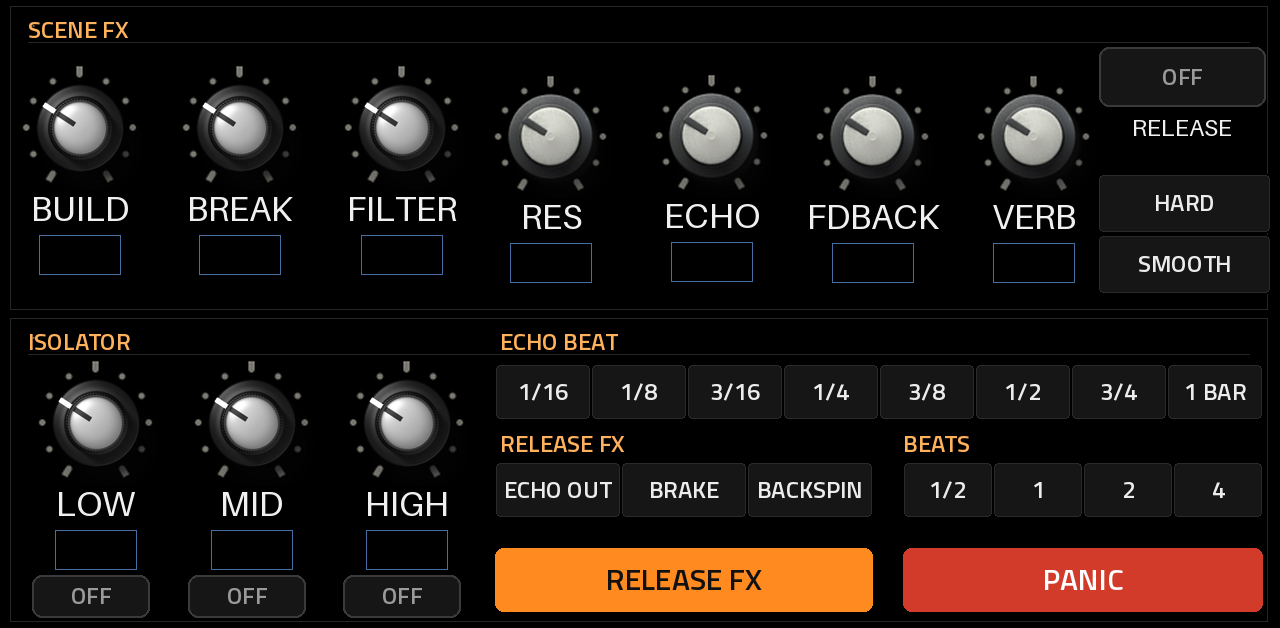
RMX-1000-style remix effect for MPC OS on the Akai Force: isolator, DJ filter, scene FX, echo, Clouds, reverbs, sample pads, limiter.
Omni Sampler
by B0ss-M · v2.3.1 · 3,697 downloads
multi-format player for the mpc
AMGR
by sunskiefer · v0.2.5 · 178 downloads
Granular sample mangler form the GR2 ("Paulstretch"-style time-stretching and smearing). "orthogonal" engine workflow with common controls like scan, spray, chord mode, and forward/reverse playback.
PotentialBreaks
by PotentialBreakfast · v1.1.1 · 19 downloads
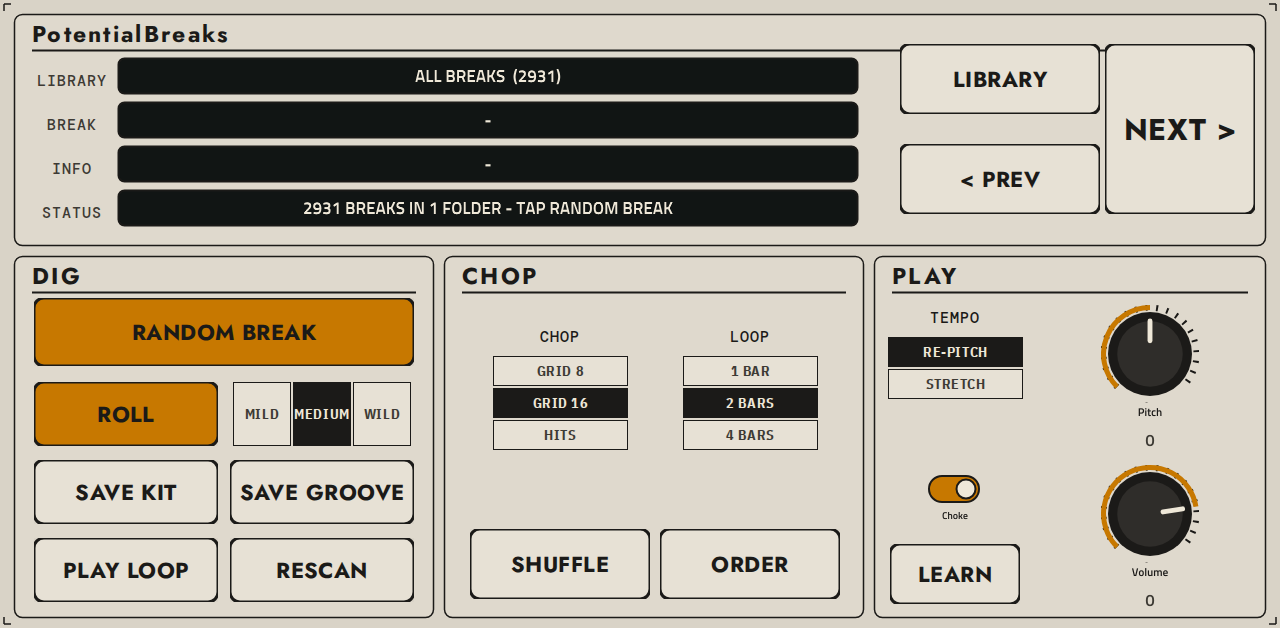
Free plugins for Akai MPC standalone: PotentialBreaks, PotentialWax, PotentialPatina, PotentialPunch, PotentialHeat, PotentialNoise
Crate Digger
by sd88me · v2.2.1 · 15,139 downloads
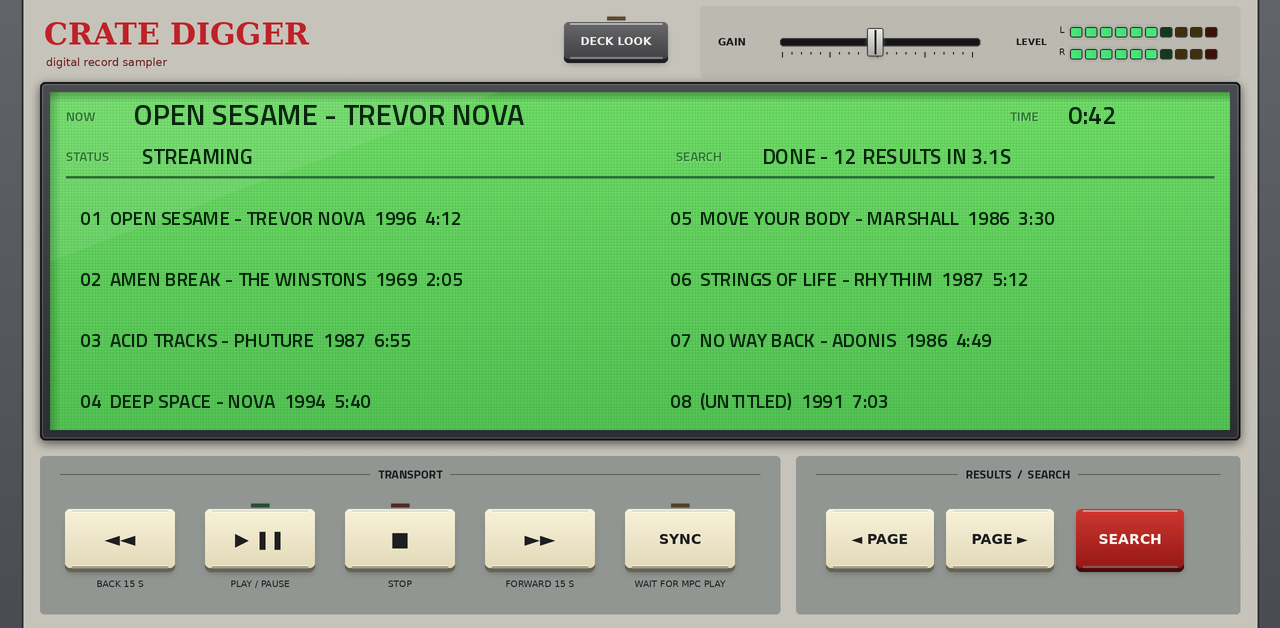
Crate Digger is a plugin instrument for Akai MPC standalone devices that digs for records and plays them into an MPC track. Pick a genre, style, decade, region and country, and it finds random releases on Discogs, then streams so you can audition and resample them.
MPC File Browser
by jacob-sabella · v1.1.1 · 5,658 downloads
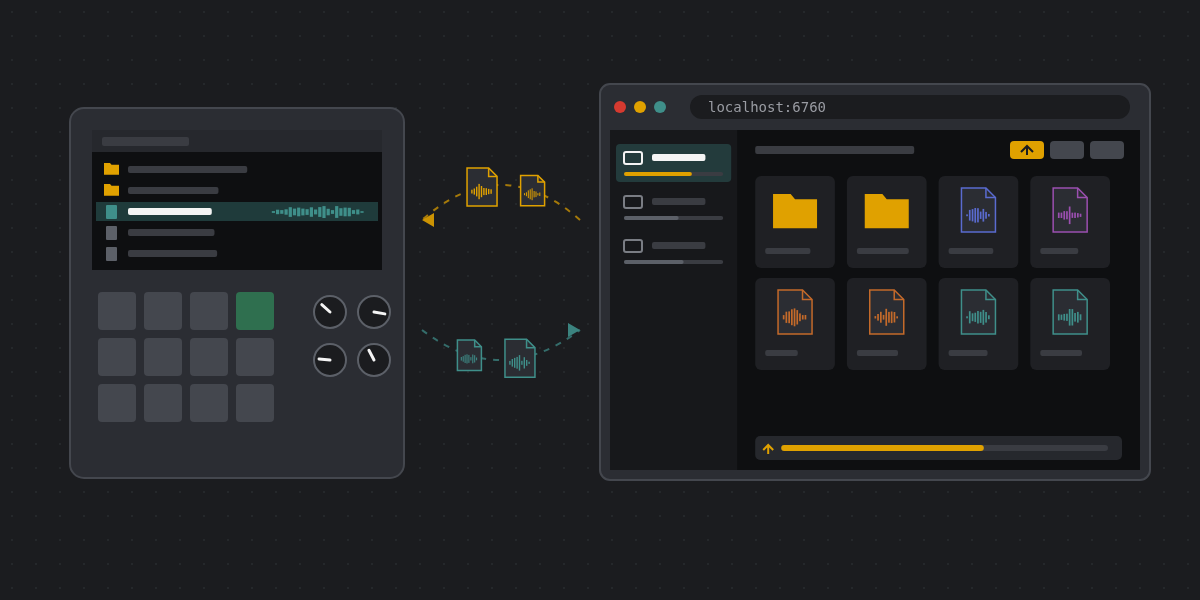
FileBrowser Quantum beside MPC on MPC OS standalone devices (Gen1 and Gen2): an addin, built from upstream releases in CI
PotentialWax
by PotentialBreakfast · v1.9.1 · 5,117 downloads
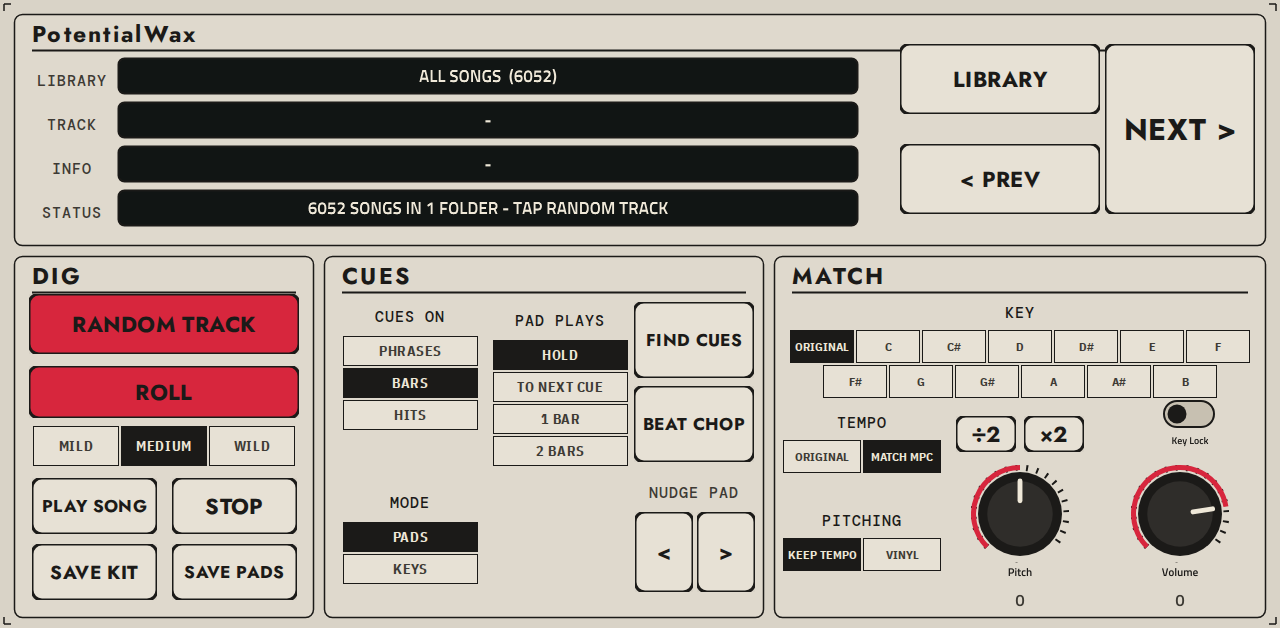
PotentialWax: a Serato Sample-style melodic sampler plugin for Akai MPC standalone
Glass Spheres
by padbangers · v1.1.0 · 4,095 downloads
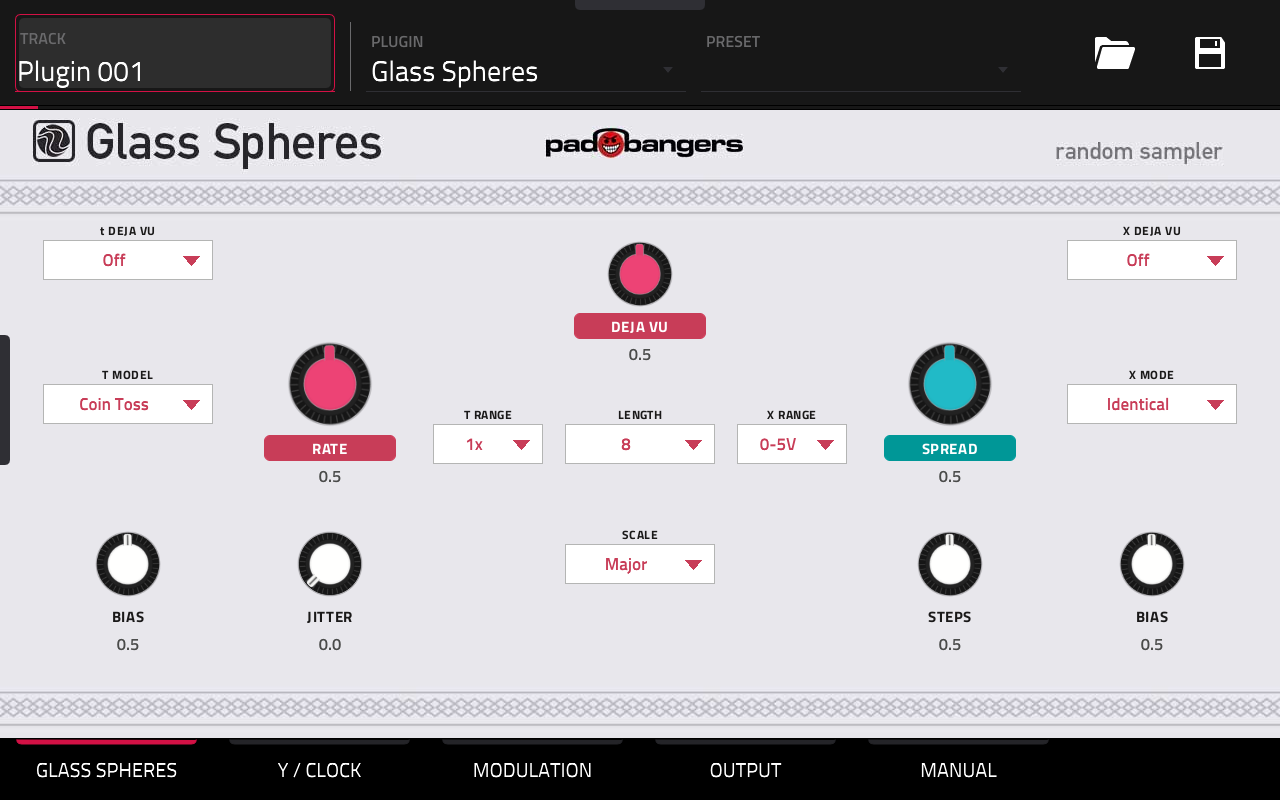
Glass Spheres: a random sampler after Mutable Instruments Marbles for Akai MPC standalone, MIDI or MPC X CV out
To improve this listing (for the creator)
- add a tested.json entry for the newest release (device and MPC OS)
Made this plugin? Add our badge to your README
 Paste this into your GitHub README. It updates itself when your plugin gets the Tested & Working badge.
[](https://thediskking.com/plugins/frodhes/)